Saturday, August 21, 2010

Does your company owe you training?

Recently I read an interesting post by Steve Jones (Blog | Twitter) on SQL Central about Personal Investments, how you invest in your career. It’s also something I’ve been thinking about lately. I agree with Steve that I’m responsible for my own education. But I feel that companies should be, to some extent, as well.

I fall into the “accidental dba” category. When a senior member of our team left I was assigned to work on maintaining and monitoring our databases, something no-one really did before that. It fell to me because I had the most knowledge about SQL Server, as opposed to just writing T-SQL statements. I learned what I could by going to all the free events I could find. I joined my local SQL User Group and attended as many meetings as possible. I bought and read many excellent SQL books and blogs. I took any free or cheap training resource that was available. Eventually I passed a number of Microsoft certification exams. I’m proud of what I’ve achieved on my own, and I will continue to further my technical education.

There’s a cost to my training, even if it’s free. There’s the hours of attending conferences and viewing webcasts. There’s the price of purchasing books, and the time it takes to read them. There’s even travel related costs, such as attending a SQL Saturday event in another state. I pay the cost gladly, and I’ve already seen the benefits.

But at what point should a company start providing training?

Now I don’t believe your company should always pay for your education. As Steve said in his post, you should make your own investment in your career, showing your managers the value of your training. You’re the one responsible for keeping your skills up to date. But it should be a partnership. Your company also needs to make an investment. They have as much to gain as you do.

This isn’t just to motivate an employee, giving you a nice job perk. Frankly, if you’re not self-motivated to get the basic skills needed to do your job maybe you should start looking for another position. But if your job suddenly requires specialized knowledge they should help you attain that knowledge.          

Let’s say, for instance, that your company has decided to use clustering for high availability. And since you’re the SQL ‘expert” they’ve come to you to set it up. You’ve read up on clustering, and you know in theory how it works. But you’ve never worked in a clustering environment, let alone design the architecture involved. Shouldn’t your company help you learn what you need to know to succeed? After all, they have more at stake in this case than you do.

I just feel that companies should also contribute to your technical education. I’m interested in how other’s feel about it.         

Monday, August 16, 2010

What I learned today – CHECKDB and database snapshots

A few days ago I was sitting in my local coffee shop, getting a little light reading done. At work we’re about to move from the Standard Edition of SQL 2005 to the Enterprise Edition and I wanted to learn more about some features of database snapshots. Snapshots are basically just a read-only copy of a database taken at a specific time. Anyway I was reading Chapter 3 – Database and Database Files in the excellent book Microsoft SQL Server 2008 Internals. The discussion turned to space allocated for the snapshots. That’s when I read that DBCC CHECKDB actually runs against a snapshot of the database.

That caught me by surprise. Until then I thought that the CHECKDB ran against the database itself.

Now I thought I was doing OK with protecting our databases. I faithfully run CHECKDB weekly against all databases and check for any errors. I set the CHECKSUM option and verify backups. I occasionally restore databases on a standby server to make sure there’s no problems with the backups. And I monitor database and drive space pretty closely.

But I was flying blind. I have no idea how near I came to having CHECKDB fail because of a lack of space. So I started digging a little deeper into CHECKDB. And I was able to learn a little bit more of how CHECKDB works with snapshots.

For anything concerning CHECKDB, your first resource should be Paul Randal (Blog | Twitter). Read his excellent series on CHECKDB From Every Angle to get a good understanding of what’s going on. And he also wrote Chapter 11 – DBCC Internals in Microsoft SQL Server 2008 Internals, a great book you should read anyway.   

CHECKDB needs a consistent view of the database to work with. In SQL 7 it acquired table locks. In SQL 2000 it analyzed the transaction log. Beginning with SQL 2005 and going forward it creates a hidden snapshot on the same volume as the database – you have no control over where it’s placed. If you’re running CHECKDB at the same time that your server has a heavy workload the snapshot can run out of space and you’ll get an error showing that CHECKDB didn’t complete. If that happens you have a few options;

  • Create your own database snapshot on a drive that has enough space and run CHECKDB against that snapshot. CHECKDB will know that its running against a snapshot and won’t create another one.
  • Start the SQL service in single user mode.
  • Put the database in read-only mode. 

Once CHECKDB has finished it will delete the snapshot if it created one.

But there are a few gotcha’s with CHECKDB creating the snapshot. First, it has to be created on an NTFS drive. Second, you can’t use the WITH TABLOCK hint. And third, you can’t run against tempdb; but why would you want to?.  

I’m sure I’m over simplifying. I still need to finish Chapter 11.

One other thing I’m wondering. If CHECKDB can create a snapshot database in SQL 2005 regardless of the edition, can the Standard Edition create one with a hidden flag?

Monday, August 9, 2010

Why I bought an iPad

Disclaimer

I bought my new iPad a week ago. I thought I’d write a post explaining why I bought one, and kind of giving it a review against other eReaders I’ve used. But I noticed that Steve Jones wrote something similar at SQL Musings a few days ago. I had almost finished my post when I read it, and I decided to go ahead and finish it with this disclaimer. But please read Steve’s post, he raises some excellent points.

Background

I read. A lot. Always have. And since I have a long daily commute I have a lot of time in which to read. My tastes range from light summer reading, books that are perfect for taking to the beach or on vacation, to heavily technical training manuals.

My problem is what to carry with me. I usually use my morning commute to study or to read the news. The afternoons are most likely spent doing research. Nights and weekends are for reading the latest novel. For instance I’m currently studying for the SQL 2008 Business Intelligence certifications so I’m going through the MS Press Training Kit for 70-448. But I’m also reading Carl Hiassen’s latest novel Star Island. And I’ve got James Lee Burke’s The Glass Rainbow on tap.

Older Devices

I’ve been reading eBooks for a while now, on any number of devices. I started by reading pdf files on my desktop computer. Then came Microsoft Reader and their .lit files. Of course Word documents and text files were included.

But the problem with using a desktop computer was that it wasn’t portable. Once I got an IT job I could justify buying a laptop computer. Even more handy were PDA devices, precursors to the smart phones of today. Each of these devices also had issues. Laptops, at least the ones I had years ago, were bulky, took a while to boot up, and generally didn’t have a lot of extra storage. And PDA screens were too small for my liking. If I made the font large enough to read comfortably then I was turning pages constantly. 

My devices now

Enter the Amazon Kindle. I know that the Sony Reader came first, but it never really tempted me. I thought the price was too high and the book selection was too small. I thought the same of the Kindle 1 when it first came out. It wasn’t until the Kindle 2 was released, with a growing number of eBooks and a cheaper price, that I got behind it.

I also had a different laptop now, an HP Pavilion TX2000 that’s a Tablet PC with a swivel screen that can run as a slate or a classic laptop. This 3 year old PC has 4 GB of RAM and a 500 GB hard drive so it can run pretty much anything I want.

And as you can tell from the title of this post, I just bought an Apple iPad. I’ve got the 16 GB WiFi model, more than enough storage for my pdfs and other documents.

I should also say I’ve ruled out the Nook from Barnes and Noble as too much like the Kindle. I know it can share books, but I don’t know anyone else with a Nook and I don’t think the eBook selection is as good as Amazon.

Kindle pros and cons

I’ve been using the Kindle 2 now since it came out and I love most of it. It’s light, easy to hold in one hand while reading. It has a large enough storage capacity of 1.5 GB, free 3G Whispernet connectivity and direct connect to Amazon or other sites to download a book in 60 seconds. You can adjust the font and the number of words per line, and the readability on the Kindle is the best of my three main devices. The battery life is 2 weeks with 3G off, 4 days with it on. And you can read in direct sunlight, so I can read just about anywhere. There’s no back light, but I have a clip-on for the few times I read in bed. The last Kindle upgrade added collections, a way of grouping my books by category.

My only regret about the Kindle is that it’s not the best device to read technical books or pdfs on. Originally, I could email a pdf to a special Kindle account and it would convert it to a Kindle-formatted ebook. Later there was an update that allows me to copy a pdf directly to the Kindle. And there’s always been 3rd party tools like MobiReader and Calibre that could convert pdfs to a format that Kindles can read. However big pdfs are a problem, and converted pdfs never really convert cleanly. The 2.5 update allows zooming into pdfs and you can rotate the screen, but there’s still an uncomfortable amount of scrolling and page turning that makes reading pdfs on the Kindle very difficult, at least for me.    

Tablet PC pros and cons

I love my tablet pc. It fits my needs as a laptop computer, allowing me to run every application I want, plus it’s Wacom and touch enabled so I can take handwritten notes. Amazon and other eBook manufacturers have released a Kindle app for pcs so I can sync my Kindle books between devices. I’ve got built-in WiFi and a Sprint 3G data card so I can connect to the internet from just about anywhere. Using Adobe Reader allows me to size my pdfs to any size I need. And when I’m studying its great to have the ability to work directly in another application to try out some of the things I’m reading about in my current pdf.

But the tablet pc is the most expensive device. It’s also has the least amount of battery life, though I have more than enough for my daily commutes. It takes the longest to start up either cold or warm. It’s the bulkiest by far. And the screen is unreadable in sunlight.

iPad pros and cons

I fought getting an iPad for a while, I really did. I thought for the most part it would just duplicate what i could already do on my tablet pc. But it does have some distinct advantages. First, it’s much lighter. Not as light as my Kindle but pounds less that my tablet. It starts up almost immediately. The larger screen makes the iPad ideal for my technical documents. I can browse the web and read emails through the WiFi connection. And like my tablet, there’s a Kindle app so I can sync up my Amazon books.

Again, like the tablet, I can’t read the screen outdoors. It’s far more expensive than the Kindle ($499 vs $139 for the lowest priced models) but not as expensive as my tablet. Battery life is started at 10 hours. That’s acceptable for my commutes but I’d have to carry a charger for vacations.

My conclusions

I really want to have a single ebook reader but my perfect device isn’t out there just yet. I want a device that can easily read all formats, has great battery life, is small enough to be carried easily, can be read in all light conditions, has Internet connectivity through WiFi or 3G, and is affordable. Until that device is available I’ll be using my iPad for technical readings and my Kindle for my more causal readings.

Tuesday, July 27, 2010

Creating your own default trace

Are you aware of the default trace that SQL Server runs when it starts? Did you know it’s configurable?

No, you can’t edit it. But you can still run a trace on startup that captures only the events that you want.

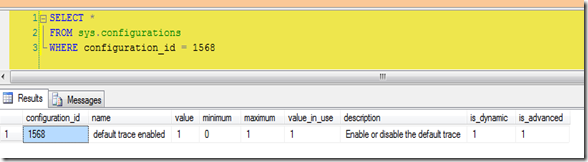
The first thing you should do is to see if the default trace is enabled. Simple enough, just run sp_configure with advanced options and look for 'default trace enabled'. Or query sys.configurations for configuration_id 1568.

SELECT * 
FROM sys.configurations
WHERE configuration_id = 1568


On my laptop it is.


image


There’s a few ways to see what the trace is doing. First find the trace id. It should be 1, but you can make sure…


SELECT * FROM sys.traces

SELECT * FROM ::fn_trace_getinfo(0)


…then query fn_traace_geteventinfo(1) to see what events the default trace is looking at. You can see the descriptions of the events by joining to some system views. 


SELECT tc.name AS [Category],
dt.eventid, te.name AS [Event Name],
dt.columnid, tcol.name AS [Column Name]
FROM ::fn_trace_geteventinfo(1) AS dt
INNER JOIN sys.trace_events AS te ON dt.eventid = te.trace_event_id
INNER JOIN sys.trace_columns AS tcol ON dt.columnid = tcol.trace_column_id
INNER JOIN sys.trace_categories AS tc ON te.category_id = tc.category_id


image 


But what if, after looking at the events that the default trace is looking at, you decide to add to the list? Or maybe you want to skip some events? Remember, you can’t alter the default trace. 


First disable the default trace. Use sp_configure, the change doesn’t require a restart. It will also close the trace.


sp_configure 'default trace enabled', 0;
go

reconfigure


Next create a stored procedure in the master database that will create and start your trace. Use sp_trace_create to generate a trace id, use sp_trace_setevent to select the events you want to capture, and finally start the trace with sp_trace_setstatus. Read more about creating traces here. If you aren’t familiar with creating traces via T-SQL use SQL Profiler to capture the events you need and set whatever properties you need then extract the trace properties to a script file.


Finally mark your new procedure to start when SQL does by using sp_procoption. This procedure takes 3 parameters; the name of your procedure, the option ‘startup’, and a true or false value. ‘Startup’ is the only option available, true sets to autostart, and false sets to not autostart. 


In my demo script below I’ve created a trace that will track what a certain user does in the database as well as when they log in or out. 


USE [master]
GO

CREATE PROCEDURE [dbo].[MyDefaultTrace]
AS

begin
declare @rc int
declare @TraceID int
declare @maxfilesize bigint
declare @filecount int
set @maxfilesize = 100
set @filecount = 5

exec @rc = sp_trace_create @TraceID output, 2,
N'C:\Perflogs\MyDefaultTrace',
@maxfilesize, NULL, @filecount

declare @on bit
set @on = 1
exec sp_trace_setevent @TraceID, 14, 7, @on
exec sp_trace_setevent @TraceID, 14, 23, @on
exec sp_trace_setevent @TraceID, 14, 8, @on
exec sp_trace_setevent @TraceID, 14, 64, @on
exec sp_trace_setevent @TraceID, 14, 1, @on
exec sp_trace_setevent @TraceID, 14, 9, @on
exec sp_trace_setevent @TraceID, 14, 21, @on
exec sp_trace_setevent @TraceID, 14, 25, @on
exec sp_trace_setevent @TraceID, 14, 41, @on
exec sp_trace_setevent @TraceID, 14, 49, @on
exec sp_trace_setevent @TraceID, 14, 57, @on
exec sp_trace_setevent @TraceID, 14, 2, @on
exec sp_trace_setevent @TraceID, 14, 6, @on
exec sp_trace_setevent @TraceID, 14, 10, @on
exec sp_trace_setevent @TraceID, 14, 14, @on
exec sp_trace_setevent @TraceID, 14, 26, @on
exec sp_trace_setevent @TraceID, 14, 66, @on
exec sp_trace_setevent @TraceID, 14, 3, @on
exec sp_trace_setevent @TraceID, 14, 11, @on
exec sp_trace_setevent @TraceID, 14, 35, @on
exec sp_trace_setevent @TraceID, 14, 51, @on
exec sp_trace_setevent @TraceID, 14, 12, @on
exec sp_trace_setevent @TraceID, 14, 60, @on
exec sp_trace_setevent @TraceID, 15, 7, @on
exec sp_trace_setevent @TraceID, 15, 15, @on
exec sp_trace_setevent @TraceID, 15, 23, @on
exec sp_trace_setevent @TraceID, 15, 8, @on
exec sp_trace_setevent @TraceID, 15, 16, @on
exec sp_trace_setevent @TraceID, 15, 64, @on
exec sp_trace_setevent @TraceID, 15, 9, @on
exec sp_trace_setevent @TraceID, 15, 17, @on
exec sp_trace_setevent @TraceID, 15, 41, @on
exec sp_trace_setevent @TraceID, 15, 49, @on
exec sp_trace_setevent @TraceID, 15, 57, @on
exec sp_trace_setevent @TraceID, 15, 6, @on
exec sp_trace_setevent @TraceID, 15, 10, @on
exec sp_trace_setevent @TraceID, 15, 14, @on
exec sp_trace_setevent @TraceID, 15, 18, @on
exec sp_trace_setevent @TraceID, 15, 26, @on
exec sp_trace_setevent @TraceID, 15, 66, @on
exec sp_trace_setevent @TraceID, 15, 3, @on
exec sp_trace_setevent @TraceID, 15, 11, @on
exec sp_trace_setevent @TraceID, 15, 35, @on
exec sp_trace_setevent @TraceID, 15, 51, @on
exec sp_trace_setevent @TraceID, 15, 12, @on
exec sp_trace_setevent @TraceID, 15, 60, @on
exec sp_trace_setevent @TraceID, 15, 13, @on
exec sp_trace_setevent @TraceID, 15, 21, @on
exec sp_trace_setevent @TraceID, 43, 7, @on
exec sp_trace_setevent @TraceID, 43, 15, @on
exec sp_trace_setevent @TraceID, 43, 8, @on
exec sp_trace_setevent @TraceID, 43, 64, @on
exec sp_trace_setevent @TraceID, 43, 1, @on
exec sp_trace_setevent @TraceID, 43, 9, @on
exec sp_trace_setevent @TraceID, 43, 41, @on
exec sp_trace_setevent @TraceID, 43, 2, @on
exec sp_trace_setevent @TraceID, 43, 10, @on
exec sp_trace_setevent @TraceID, 43, 3, @on
exec sp_trace_setevent @TraceID, 43, 11, @on
exec sp_trace_setevent @TraceID, 43, 35, @on
exec sp_trace_setevent @TraceID, 43, 51, @on
exec sp_trace_setevent @TraceID, 43, 12, @on
exec sp_trace_setevent @TraceID, 43, 5, @on
exec sp_trace_setevent @TraceID, 43, 13, @on
exec sp_trace_setevent @TraceID, 43, 6, @on
exec sp_trace_setevent @TraceID, 43, 14, @on
exec sp_trace_setevent @TraceID, 43, 62, @on
exec sp_trace_setevent @TraceID, 45, 7, @on
exec sp_trace_setevent @TraceID, 45, 8, @on
exec sp_trace_setevent @TraceID, 45, 64, @on
exec sp_trace_setevent @TraceID, 45, 1, @on
exec sp_trace_setevent @TraceID, 45, 41, @on
exec sp_trace_setevent @TraceID, 45, 10, @on
exec sp_trace_setevent @TraceID, 45, 3, @on
exec sp_trace_setevent @TraceID, 45, 11, @on
exec sp_trace_setevent @TraceID, 45, 35, @on
exec sp_trace_setevent @TraceID, 45, 51, @on
exec sp_trace_setevent @TraceID, 45, 12, @on
exec sp_trace_setevent @TraceID, 45, 5, @on
exec sp_trace_setevent @TraceID, 45, 13, @on
exec sp_trace_setevent @TraceID, 45, 6, @on
exec sp_trace_setevent @TraceID, 45, 14, @on
exec sp_trace_setevent @TraceID, 45, 62, @on
exec sp_trace_setevent @TraceID, 45, 15, @on
exec sp_trace_setevent @TraceID, 41, 7, @on
exec sp_trace_setevent @TraceID, 41, 15, @on
exec sp_trace_setevent @TraceID, 41, 8, @on
exec sp_trace_setevent @TraceID, 41, 64, @on
exec sp_trace_setevent @TraceID, 41, 1, @on
exec sp_trace_setevent @TraceID, 41, 41, @on
exec sp_trace_setevent @TraceID, 41, 10, @on
exec sp_trace_setevent @TraceID, 41, 3, @on
exec sp_trace_setevent @TraceID, 41, 11, @on
exec sp_trace_setevent @TraceID, 41, 35, @on
exec sp_trace_setevent @TraceID, 41, 51, @on
exec sp_trace_setevent @TraceID, 41, 12, @on
exec sp_trace_setevent @TraceID, 41, 5, @on
exec sp_trace_setevent @TraceID, 41, 13, @on
exec sp_trace_setevent @TraceID, 41, 6, @on
exec sp_trace_setevent @TraceID, 41, 14, @on


-- Set the Filters
declare @intfilter int
declare @bigintfilter bigint

exec sp_trace_setfilter @TraceID, 11, 0, 6, N'BadUser'

exec sp_trace_setstatus @TraceID, 1

end

GO

EXEC sp_procoption N'MyDefaultTrace', 'startup', '1'

GO


Now when I check to see what traces are running trace id #1 is the trace created in my procedure. The trace start is also written to the SQL error log when the master database starts.


image 


As always, please test this on a server you can play with before putting into production.

Wednesday, July 21, 2010

Winning the DBA Open

Last weekend I, like millions of other golf fans around the world, watched as Louis Oosthuizen, an unknown (at least to me) golfer out of South Africa, won The Open Championship at St Andrews by an astounding 7 strokes. He showed confidence in his abilities throughout the tournament, never losing his composure playing in some of the toughest conditions on any course in the world. Congratulations, Louis!


As i watched the game, I began to think that being a DBA and being a champion golfer weren’t that different. Both need to be confident in their abilities, both need to have a solid game plan, and both have to be able to execute their craft under pressure, being prepared for any eventuality.

Preparing for the tournament

A good golfer gets to the course early, days before the tournament begins. They play the course, talk to locals to learn any particular quirks the course may have, and practices hundreds of shots of different lengths or difficulties.

golfer

Good DBAs do the same. They find out about the host server, talking to the system team or SAN administrator; what kind of disk subsystem is there? what’s the memory or CPU like? does the server meet the requirements for SQL?

You drive for show…

The golfer starts his round on the tee. He’ll determine the club to use based on experience and conditions; where’s the wind coming from? how long is the hole? where’s the danger spots? A well hit drive will end up far down the fairway, perfectly placed for his next shot. 

Click to view

The DBA does the same when he sets up the server. His experience comes into play knowing what has to be done, and server conditions will help him to correctly place the system databases and data and log files for other databases. He’ll know what options to set and what to set them to. His server will be set up to optimal conditions, perfectly placed for hosting the company data.

…the approach shot…

Now the golfer will try to get his ball onto the green. He’ll again choose the right club, line up the shot, take a practice swing or two, then hits his best shot. He’ll know how his ball will fly because he has hit the same shot hundreds of times before so he can compare against past performance.

Click to view

The DBAs approach shot is to benchmark his system. He should know how the server will perform during peak and non-peak times.

---getting out of a hazard…

Sometimes, though, the golfer’s approach shot is mishit. Or maybe a gust of wind holds up the shot and it lands in a greenside bunker. A good golfer knows how to get out of those situations and save par.

humorous golf hazard

Similarly, a DBA must know how to get out of disaster scenarios. He knows he has set up and is maintaining  a proper backup strategy and has practiced recovering databases until he knows the procedure inside and out. He knows the different options available for DBCC CHECKDB.

---and you putt for dough

This is where the good golfers shine. They don’t fade when standing over a three foot putt with the tournament on the line. They know they’ve made the same putt over and over before, and they’ve practiced for just this occasion. They read the putt’s line, judge the speed, and with millions of eyes watching they calmly knock it hit it center cup. 

Click to view

The DBA also is good under pressure. They’ve written and checked over their scripts, and they’re confidant they’ll perform as written. They don’t wilt when the CIO is standing over their shoulder asking why performance is so bad on their server. 

The caddy…

All good golfers know the value of their caddy. A caddy’s job is to help his golfer, pointing out the course yardage, offering the right club, taking some of the pressure of the golfer. Sometimes the caddy is also a teacher, pointing out flaws in the golfer’s swing.

Golf Caddies Baltusrol

A DBA also needs a caddy. Their caddy can be a mentor or coworker at work. They can use social networks for advice on specific problems or as a sounding board.      

Preparing for the next tournament

The golfer is always practicing. He’s at the driving range on his day off, constantly working on correcting swing flaws and working on new shots.

Likewise the DBA is constantly learning. They attend their local PASS chapter meetings or go to national conventions. They’re constantly reading blogs and whitepapers, learning new skills to help them manage their servers or help their company.

The moral? Like in golf, or any endeavor, the secret of being a good DBA is to be prepared. Learn your craft. Ask your caddy when you have questions. Practice when you’re able. Keep learning. And you too can win the DBA Open.

Monday, July 19, 2010

What I learned today – importing mixed data types from Excel

Recently a coworker came up with an issue I never ran into before. He’s importing a large number of Excel spreadsheets into a SQL 2005 instance. One of the columns contains mixed data; 1, 2, 3, x, y, z for example. What he found is that if the first 20 or so rows are strictly numeric then the connection treats the whole column as numeric, and alphanumeric values are returned as NULLs. He’s querying using OPENROWSET, but it looks like this happens in SSIS as well. 

What his research found was that there’s a few registry keys that come into play. There’s also another property he needed to set in his connection string. When he adds “IMEX=1” it allows importing of mixed data types based on the the registry setting “ImportMixedTypes”. The default value is “text”. One drawback to text is that you’re limited to 255 characters. The only other available value is “Majority Type”. When you use Majority Type some of the values are scanned and the data type with the most values is used.

The number of rows scanned is based on the “TypeGuessRow” registry setting. By default it’s set to 8, but valid values are 0 to 16. If you set it to 0 then all rows are sampled. Setting it to a value between 1 and 16 samples that number.

Both keys can be found at HKEY_Local_Machine/Software/Microsoft/Jet/4.0/Engines/Excel/.  

Here are a few articles that explain the issue better.

http://jingyang.spaces.live.com/blog/cns!CC21A118B1B5250!318.entry?sa=781031802

http://www.instantpages.ltd.uk/ADODB_WP.htm

UPDATED 7/20/2010: You can read more about the actual issue here.

Wednesday, July 14, 2010

Changing the name of your SQL server

My company recently changed their standard naming conventions for computers, so yesterday I had to rename my workstation. Usually this isn’t a big deal, except that I’m running locally a default instance of SQL 2005 and a named instance of SQL 2008.Again, not a big deal since this is just my local playground. But I wanted to sync up the names.

Let’s say that my laptop was named “CHICAGO”. That makes the default instance also “CHICAGO'”, and my named instance “CHICAGO\KATMAI”. Now my laptop name changed to “NEWCHICAGO”. My SQL instances stay as “CHICAGO” and “CHICAGO\KATMAI”. How do you change them to match the new computer name?

Couldn’t be simpler, just execute two procedures. For the default instance.

USE master;
GO

EXEC sp_dropserver 'CHICAGO';
GO

EXEC sp_addserver 'NEWCHICAGO', local;
GO

It’s the same for a named instance. Just add the instance name.

USE master;
GO

EXEC sp_dropserver 'CHICAGO\KATMAI';
GO

EXEC sp_addserver 'NEWCHICAGO\KATMAI', local;
GO
Then, just restart the SQL service and you should see the name change.


Note, though, that this only changes the server name, not the instance name.  I haven’t had an opportunity to try that yet.