One of the things I like about Microsoft is the wealth of training they make available for their products. There was a training kit for ASP.NET, one for Visual Basic 2008, and now there’s one for SQL Server 2008. You can get yours at http://www.microsoft.com/downloadS/details.aspx?familyid=E9C68E1B-1E0E-4299-B498-6AB3CA72A6D7&displaylang=en
Showing posts with label SQL 2008. Show all posts
Showing posts with label SQL 2008. Show all posts
Wednesday, August 5, 2009


Tuesday, January 20, 2009
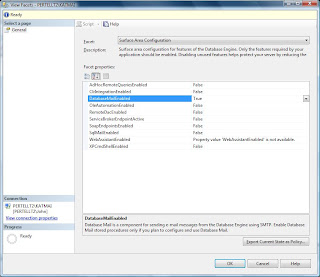
One of the first things you'll probably notice is the Surface Area Configuration Tool, introduced in SQL 2005, is not there. Actually it's still part of the server, only its moved. Now you access it by connecting to the server using the Management Studio, right clicking on the server name and choose "Facets" from the menu. When the View Facet screen opens, select "Surface Area Configuration" from the Facet combo box. Notice that by default all options are turned off; I specifically turned Database Mail on.

Thursday, December 18, 2008
Reporting Service "features"
I've been a proponent of Microsoft's SQL Server Reporting Services (SSRS since 2005) since it was first released in beta for SQL 2000. I thought the product was a natural, combining a report writer with the database. I especially loved the ease of deploying individual reports. The first product was rough, but I figured it would improve with time. By the time SSRS 2005 came out it was a stable product, but it lacked some features, like rich textbox formatting and exporting to MS Word. SSRS 2008 added those features, so I thought all was right with the world. Silly me.
My client has been using some reports written for SSRS 2005. Recently we began converting their existing reporting application from MS Access 97 (please don't snicker too loud) to SSRS 2008. We started with small, simple reports. These worked out nicely, and developers were able to learn how to use the report designer fairly quickly. I began converting a much more complex report that had tons of Access code-behind and sub reports. Much on the report is determined by what the user wants to see. Creating the report in SSRS 2008 was time consuming, but it worked out nicely.
The "features" came out after I created the first, main report and checked the reporting project into Visual Source Safe. After that I started running into all kinds of problems, some of which are;
○ Very often, with no reason, credentials for the data sources would change from what we use to no credentials. I first noticed this after I checked the solution out of VSS. At first I thought the last person to check out the file changed it for some reason. Then I noticed that it didn't matter who last touched the file; even files that were never checked out were affected. And this also happened to files that were never checked into VSS.
○ Another annoyance is when a dataset changed from running a stored procedure to running text. This can happen if you modify the data source (see above), and also happened in SSRS 2005 if you merely opened the dataset definition to see what it was pulling.
○ Inconsistent behavior. For instance, the main report has 2 very similar sub reports. The user can choose to see sub report A, sub report B, or neither. Simple, right? Just set the sub-report visibility to display based on the user's choice. It worked fine if the user chose A or B; the correct sub report was displayed and the correct sub report was hidden. But if the user chose to hide both, then both display. I'm not going to post the code here, but suffice it to say the code was correct; it's being used on many other sub reports on the same main report. So how did I fix it? I moved the code to a report function. The bottom line is the very same code that didn't work as an expression of the visibility property of the sub report worked correctly when called as a function!
There's more, but this is enough for this post. I'll be adding to it soon.
My client has been using some reports written for SSRS 2005. Recently we began converting their existing reporting application from MS Access 97 (please don't snicker too loud) to SSRS 2008. We started with small, simple reports. These worked out nicely, and developers were able to learn how to use the report designer fairly quickly. I began converting a much more complex report that had tons of Access code-behind and sub reports. Much on the report is determined by what the user wants to see. Creating the report in SSRS 2008 was time consuming, but it worked out nicely.
The "features" came out after I created the first, main report and checked the reporting project into Visual Source Safe. After that I started running into all kinds of problems, some of which are;
○ Very often, with no reason, credentials for the data sources would change from what we use to no credentials. I first noticed this after I checked the solution out of VSS. At first I thought the last person to check out the file changed it for some reason. Then I noticed that it didn't matter who last touched the file; even files that were never checked out were affected. And this also happened to files that were never checked into VSS.
○ Another annoyance is when a dataset changed from running a stored procedure to running text. This can happen if you modify the data source (see above), and also happened in SSRS 2005 if you merely opened the dataset definition to see what it was pulling.
○ Inconsistent behavior. For instance, the main report has 2 very similar sub reports. The user can choose to see sub report A, sub report B, or neither. Simple, right? Just set the sub-report visibility to display based on the user's choice. It worked fine if the user chose A or B; the correct sub report was displayed and the correct sub report was hidden. But if the user chose to hide both, then both display. I'm not going to post the code here, but suffice it to say the code was correct; it's being used on many other sub reports on the same main report. So how did I fix it? I moved the code to a report function. The bottom line is the very same code that didn't work as an expression of the visibility property of the sub report worked correctly when called as a function!
There's more, but this is enough for this post. I'll be adding to it soon.
Thursday, July 10, 2008
SQL 2008 on August price list
OK, I guess this means we can order it next month. However this articlefrom a TechNet blog only states that 2008 will be on the August list, not that it will ship then.
But this is still good news. If it doesn't ship in August, surely it will be very soon after.
But this is still good news. If it doesn't ship in August, surely it will be very soon after.
Catching up after vacation
First and foremost, I passed 70-447 on June 27th. I'm done with the 2005 exams, not going to worry about the BI track since I'm not that fluent in SSAS or SSIS (I do know SSRS pretty well, though). So I made my goal of being certified in SQL 2005 before SQL 2008 came out.
Speaking of which, Microsoft just announced yesterday that 2008 will ship in August. More on that later.
Speaking of which, Microsoft just announced yesterday that 2008 will ship in August. More on that later.
Tuesday, June 10, 2008
Installing RC0, Part 1
OK, so I installed SQl 2008 RC0 yesterday. It was mostly successful. But it was missing the Business Intelligence stuff. I know that there's an issue where you can't upgrade an existing BI install. But I'm running SQL2005 and I was able to install CTP6 with no problems. Unfortunately I don't remember the steps I took to install BI for SQL2008. I did uninstall CTP6 before starting in on RC0.
I've reverted back to CTP6 and I'll try again. This time I'll document the uninstall steps. I obviously missed something.
I've reverted back to CTP6 and I'll try again. This time I'll document the uninstall steps. I obviously missed something.
Friday, June 6, 2008
SQL 2008 RC0 is out
At least it's available through TechNet and MSDN. I'm downloading it now, and I'll play with installing it on my train rides next week. I can't really dig deep since I'm concentrating on 70-447. But once that's over...
Friday, February 29, 2008
CTP6 issue with leap year
I just ran across this, ironic since I just updated a test computer from CTP5 to CTP6and wondered why it wasn't working;
"We have recently discovered an issue with SQL Server 2008 CTPs that result in SQL Server 2008 not starting or installing on Feb 29 GMT only. We recommend that you do not run, install or upgrade this CTP on Feb 29 GMT to minimize any impact in your environment. You can install starting on March 1 GMT. If you have an immediate issue that cannot wait until March 1st GMT contact csskat@microsoft.com before taking any further steps."
I mean, I know it's pre-release and all but come on - leap year?
"We have recently discovered an issue with SQL Server 2008 CTPs that result in SQL Server 2008 not starting or installing on Feb 29 GMT only. We recommend that you do not run, install or upgrade this CTP on Feb 29 GMT to minimize any impact in your environment. You can install starting on March 1 GMT. If you have an immediate issue that cannot wait until March 1st GMT contact csskat@microsoft.com before taking any further steps."
I mean, I know it's pre-release and all but come on - leap year?
Thursday, February 21, 2008
CTP6 - Backup compression

The Enterprise Edition of SQL 2008 now offers the ability to compress database backups. If you use the GUI for the backup, the compression option is the last choice on the Options page
Once there you'll have 3 choices; Use the default server setting (set to 0 after installation, use sp_configure to change it), Compress backup, and Do not compress backup. If you use a script, just add the COMPRESSION keyword:
BACKUP DATABASE [AdventureWorks] TO DISK = N'C:\ADWorks.bak'
WITH NOFORMAT, INIT, NAME = N'AdventureWorks-Full Database Backup', SKIP, NOREWIND, NOUNLOAD, COMPRESSION, STATS = 10
GO
I tested backing up the AdventureWorks sample database (always a good idea if you're going to play with it). The uncompressed file size is roughly 175 MB; the compressed is about 40.25 MB. There's not much free space in the database, less that 1 MB, and the size of the database matches the uncompressed size, which is what I expected.
What I didn't expect is that the compressed backup appears to have run faster than the uncompressed backup. When testing I ran each backup 3 times and I only used the default settings (other than the compression option). Both backed up to the same disk drive and nothing else was running at the time that would have affected the backup.
Here's a sample output from the uncompressed backup:
BACKUP DATABASE [AdventureWorks] TO DISK = N'c:\ADWorks_Uncompressed.bak'
WITH NOFORMAT, INIT, NAME = N'AdventureWorks-Full Database Backup',
SKIP, NOREWIND, NOUNLOAD, STATS = 10
GO
Processed 21864 pages for database 'AdventureWorks', file 'AdventureWorks_Data'
on file 1.
100 percent processed.
Processed 1 pages for database 'AdventureWorks', file 'AdventureWorks_Log'
on file 1.
BACKUP DATABASE successfully processed 21865 pages in 20.349 seconds (8.394 MB/sec).
And here's a sample from the compressed version:
BACKUP DATABASE [AdventureWorks] TO DISK = N'C:\ADWorks.bak'
WITH NOFORMAT, INIT, NAME = N'AdventureWorks-Full Database Backup',
SKIP, NOREWIND, NOUNLOAD, COMPRESSION, STATS = 10
GO
Processed 21864 pages for database 'AdventureWorks', file 'AdventureWorks_Data'
on file 1.
100 percent processed.
Processed 2 pages for database 'AdventureWorks', file 'AdventureWorks_Log'
on file 1.
BACKUP DATABASE successfully processed 21866 pages in 13.003 seconds (13.137MB/sec).
But then I remembered Idera's SQLSafe program. I ran the evaluation version a while back. I thought the speed increase there was due to some trick of Idera's. That's not really the case. Read this from the CTP's BOL:
Performance Impact of Compressing Backups
Because a compressed backup is smaller than an uncompressed backup of the same data, compressing a backup typically requires less device I/O and therefore usually increases backup speed significantly.
By default, compression significantly increases CPU usage, and the additional CPU consumed by the compression process might adversely impact concurrent operations. Therefore, you might want to create low-priority compressed backups in a session whose CPU usage is limited by Resource Governor. For more information, see How to: Use Resource Governor to Limit CPU Usage by Backup Compression (Transact-SQL).
That makes sense. It takes less time to write a smaller file than a larger file. So I was looking in the wrong area. I should have been checking the CPU counters.
SQL 2008 February CTP is available
CTP6 is available at http://www.microsoft.com/downloads/details.aspx?familyid=749bd760-f404-4d45-9ac0-d7f1b3ed1053&displaylang=en&tm
I've just finished installing it and I'm starting to poke around a bit. Now I haven't been keeping up with the new or changed features in SQL2008, and I havn't played with the previous CTP's. So I was surprised to see that the Area Configuration Tool is not there. What's replaced it? Or is it just missing from the CTP and it will be in the final rollout? Definitely something to look into.
The installation went pretty smooth. SQL 2008 is running next to SQL 2005 on this computer and there were no conficts during the installation. I did have one issue, though. When I tried to set up the accounts to run the different SQL services, it told me the password was wrong. No, I wasn't typing it incorrectly, I tried many times. I finally got past that by creating a new administrator account and used that to run the services. Later I'm going to go back and change what account they run under, to see if it will allow me to do that.
I'll be back when I poke around a bit more.
I've just finished installing it and I'm starting to poke around a bit. Now I haven't been keeping up with the new or changed features in SQL2008, and I havn't played with the previous CTP's. So I was surprised to see that the Area Configuration Tool is not there. What's replaced it? Or is it just missing from the CTP and it will be in the final rollout? Definitely something to look into.
The installation went pretty smooth. SQL 2008 is running next to SQL 2005 on this computer and there were no conficts during the installation. I did have one issue, though. When I tried to set up the accounts to run the different SQL services, it told me the password was wrong. No, I wasn't typing it incorrectly, I tried many times. I finally got past that by creating a new administrator account and used that to run the services. Later I'm going to go back and change what account they run under, to see if it will allow me to do that.
I'll be back when I poke around a bit more.
Subscribe to:
Posts (Atom)